
The CRI is proud to offer REDCap, a self-managed, secure, web-based solution designed to support data collection strategies for research studies.


Note: If you would like to use REDCap for COVID-19 research, please refer to this summary of available resources and find further information here.

NEWS

REDCap Downtime and Upgrade

By News, REDCap

Event: REDCap Scheduled Downtime and Upgrade

Date/Time: Friday, March 13th, 2026, 5PM

Website: https://redcap.uchicago.edu

Reason: REDCap will be upgraded to the latest version to introduce new functionality and apply critical security enhancements.

Who Is Affected: All University of Chicago REDCap users, including non-UChicago external collaborators, mobile app users, API users, and survey participants.

Impact: REDCap will be unavailable starting at 5PM for approximately 2–4 hours. Unavailability is defined as:

  • Survey emails (manual and automated) and Alerts & Notifications will be halted until the upgrade is complete.
  • Survey links will be inaccessible and will display a REDCap is offline message when clicked on.
  • API activity will be halted until the upgrade is complete.

Updates: A message will be posted on the REDCap login page confirming the upgrade’s completion, along with details of the newest features and improvements.

Questions? Please email REDCap Support.


ABOUT REDCAP

WHAT IS REDCAP?

The Biological Sciences Division’s Center for Research Informatics (CRI) is proud to offer REDCap, a self-managed, secure, web-based solution that is designed to support data collection strategies for research studies. This easy-to-use and intuitive tool provides functionality and features to enable researchers to rapidly develop databases and surveys for collecting and managing research data.  It can also support data collection efforts for operational uses and Quality Improvement projects. Data is securely kept on BSD servers at the Kenwood Data Center.

The REDCap project was initiated at Vanderbilt University and includes more than 7,000 active institutional partners from CTSAs, GCRCs, RCMI, and other institutions, including the University of Chicago, in a collaborative international consortium. The consortium contributes to the continuing evolution of the tool and provides a valuable sounding board and testing resource for the Vanderbilt team. REDCap is currently in production use or development build status for more than 2.7 million projects, with over 4.3 million end users in over 160 countries spanning numerous research focus areas across the consortium. Here at the University, we have over 22,000 projects with over 14,000 end users.

WHY USE REDCAP?

REDCap offers the following features:

  • Fast. Quick project start-up. Data entry forms and surveys can be implemented without the need for a programmer.
  • Easy. Intuitive user interface and workflow, readily available online training materials, and assistance from the CRI all make it easy to get started.
  • Fully customizable. You are in control of shaping your database.
  • Web-based. Enter data or build your database from anywhere in the world over a secure web connection with authentication and data logging.
  • Secure. Backed up offsite nightly and hosted in a secure environment maintained by the CRI.
  • Data hosting. No need to worry about security issues regarding third party websites hosting your private data.
  • Data import. Import data from Microsoft Excel and Access (csv files).
  • Data export. Export data to Excel, SAS, Stata, R, and SPSS.
  • Audit trail. Track data manipulation, project changes, imports, and exports by date and user.
  • Advanced features. Mid-study modifications, auto-validation, branching logic, and calculated fields.
  • Scheduling. Utilize a built-in project calendar and scheduling module for organizing your events and appointments.
  • Reports and stats. Online tool allows you to view reports of your data, export your reports, and turn your reports into plots, graphs, and statistics.
  • Autonomous user management. Research groups have complete autonomy and control to add new users and set several levels of specific user rights.
  • Multi-site access. REDCap can be used by researchers from multiple sites and institutions.
  • Survey participant list. Build a list of email contacts, create custom email invitations, and track who responds.
  • Anonymous surveys. Keep your participant responses anonymous (default), or if desired, responses from email contacts can be identified.
  • Survey PDF. Generate a PDF version of your survey for printing to collect responses offline.
  • Mobile app. Available for iOS and Android for offline data collection by the project team.


FREQUENTLY ASKED QUESTIONS (FAQs)


I NEED ACCESS/HOW DO I LOG IN?

  • Log in with University CNetID. Enter your account as the username; then enter your account’s current password.
  • Please do not use your email address as your username.

IS TRAINING AVAILABLE?

  • REDCap provides training videos covering fundamental concepts and features. Topics include:
    • Just Getting Started
    • Building a Project
    • Basic Features & Modules
    • Types of REDCap Projects
    • Special Features
  • There are a host of additional training resources on our CRI REDCap Training site.
  • From time to time, REDCap seminars are also offered as part of the CRI Seminar Series. Sign up to be notified of and register for future seminars.

WHERE CAN I GET HELP?

  • Support is typically offered Monday-Friday from 9am-5pm. Outside of this timeframe and/or your request is urgent, contact REDCap Support.
  • Support requests are often handled same-day depending on nature of the request and the amount of overal incoming requests. During high volume periods, requests can take up to 24-48 hours to process.
  • Visit REDCap’s extensive Help&FAQ page from the REDCap home page menu bar or the lower-left corner of your project.
  • Visit the CRI REDCap Support site for additional help resources.
  • Contact REDCap Support for an initial consultation to see if REDCap is the right tool for your data collection needs, or if you need design guidance on a new project, or if you need help with specific features and functionality.
  • The internet is also a good source for learning about REDCap but keep in mind, there are many versions of REDCap, so you may find a feature online that is not available locally. Please check with REDCap Support on feature availability.
  • Please do not use REDCap Messenger to request help as it is not monitored for help requests.

HOW CAN I GRANT ANOTHER USE ACCESS TO MY PROJECT?

  • If you have access to your project’s User Rights page, simply search for the user’s name, select it, and then assign their appropriate user rights.
  • If their name is not listed in the ‘Add new user’ box, they either:
    • have never logged in (and therefore, simply need to log in to set up their profile), or
    • their access is suspended due to inactivity (and therefore, should contact REDCap Support to have it unsuspended).
  • Please do not add the user’s email address to your project’s User Rights page, as this will not grant your user access.

IS ACCESS AVAILABLE FOR EXTERNAL USERS?

MY ACCESS IS SUSPENDED:

  • If REDCap states your account is suspended upon log in, contact REDCap Support to have your access unsuspended.
  • Access is auto-suspended after one year of no login activity. Please log in at least yearly to avoid suspension.

I NEED PASSWORD HELP:

  • Passwords are not stored by or managed by REDCap.
  • To reset your password, visit the My Account site. Click on “Reset Password”. Enter your CNetID. Click Next. Choose security question. Click next. Authenticate with DUO. Create password or passphrase. Confirm password or passphrase. Submit.
  • If you need further help, contact the following Help Desks based on your account type:


WHERE TO START


REDCap allows users to build and manage online surveys and databases quickly and securely. Users have the freedom to start their projects and begin designing their forms and surveys often within a few short minutes. Start with our training page to help you learn the basics of REDCap via training videos, training manuals, advanced features, quick tips, and FAQs. You can then log in to REDCap with either your BSDAD or UCHAD account and explore the Help&FAQ page for additional help within the application itself. If you need further help at this point, email REDCap Support to set up a working session with the CRI’s REDCap Administrator.

STILL UNSURE?

We can help you determine whether REDCap is an appropriate solution for your research data collection needs by providing a brief demo and discussing whether REDCap is a good fit for your project. Please email REDCap Support to set up a consultation session with the CRI’s REDCap Administrator.

MEET OUR REDCAP EXPERT

Julissa Acevedo has served as the Clinical Research Informatics (CRI) REDCap Administrator at the University of Chicago since 2012 and is the primary point of contact for REDCap support across the institution. She has helped countless investigators design and implement REDCap projects and is known for providing exceptional technical support. An active member of the REDCap Consortium, Julissa attends REDCapCon annually to stay current on best practices and innovative solutions. She played a key role in the UChicago’s successful hosting of REDCapCon 2018, has been invited to train fellow REDCap administrators at REDCapU, and has received multiple REDCap Consortium awards for her training materials. In 2020, she received the Biological Sciences Division Excellence in Staff Collaboration Award for her leadership in supporting secure data capture during the COVID-19 response, including developing a compliant remote electronic consent process that enabled research continuity. Prior to joining the CRI, Julissa held application support roles at Motorola, Bank of America, and the U.S. Census Bureau, bringing a broad foundation of technical expertise to her role in academic research support.


ACCOUNTS & PASSWORDS

NEW USERS

New users can log in to REDCap with their University issued CNetID.

EXTERNAL ACCOUNTS

To request accounts for users from external collaborating institutions, fill out the BSDIS Collaborator Account Request Form. The BSDIS Help Desk will follow up on this request.

ADDING A USER TO A PROJECT

First, check to see if you have access to your project’s User Rights page which is on the left-hand side Applications menu. If you don’t have access, contact REDCap Support or check with other project user who may have access to the page to grant you access.

Next, click on the Add new user box and begin typing your user’s name. Select it once it appears in the list. Click on Add with custom rights. Click on the boxes of the rights to be assigned. Click on Add user. 

If you don’t see your user listed in the Add new user box, there are two possible reasons:

  1. If you do not find the user listed, and they have logged in before, their access may be suspended due to inactivity. Contact REDCap Support to have their access unsuspended.
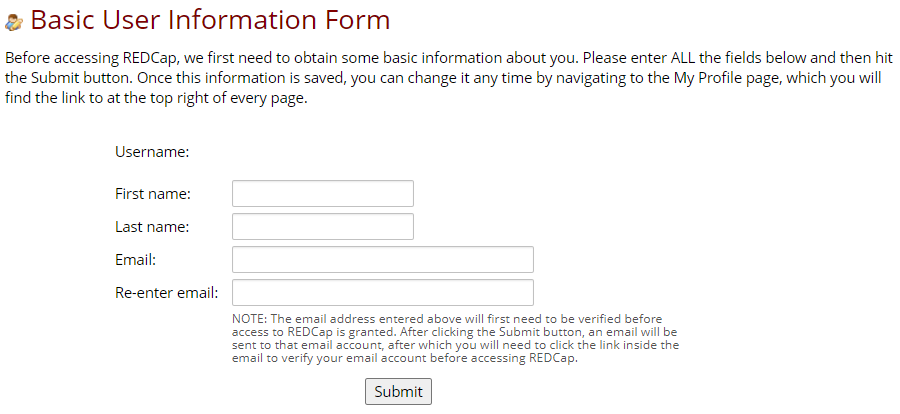
  2. If they have never logged into REDCap, ask your user to log in and set up their profile with the following form. Once set up, you should be able to find and select their username in the Add new user box.

*Note, if your project has User Roles set up, make sure to add the user to the appropriate role if necessary.

**Please do not enter the user’s email address in the Add new user box, as this will not grant them access.

PASSWORD RESETS

Passwords are not stored or managed by REDCap.

To reset your password, visit the My Account site. Click on “Reset Password”. Enter your CNetID. Click Next. Choose security question. Click next. Authenticate with DUO. Create password or passphrase. Confirm password or passphrase. Submit.

If you need further help, contact the following help desks based on your account type:


REDCap 21 CFR Part 11

Compliance Statement

Research faculty and staff often use electronic applications to maintain records and create signatures necessary to support human research activities, some of which are governed by FDA regulations. Sponsors occasionally request certification of compliance with 21 CFR Part 11. This notice provides information about the University’s use of the REDCap system with Part 11 requirements. University researchers, sponsors, or others seeking certification of compliance for FDA-regulated studies, may request a copy of our Statement of Compliance to maintain it with other required research documents.

Validation Report

The University’s instance of REDCap was initially validated for 21 CFR Part 11 compliance back in 2017. We upgrade yearly (approximately) and a revalidation of the system and a review  and update of SOPs is performed with each upgrade. The CRI ensures the REDCap system operates per its intended use, defined by the system requirements. The intended use statement for the REDCap system is as follows: The REDCap system will be available for electronic data capture across a number of research use cases, including but not limited to, general survey and case report form (CRF) data collection for IRB-approved research studies and investigator and sponsor-initiated clinical trials requiring adherence to 21 CFR Part 11, Electronic Records and Electronic Signatures. University researchers may request a copy of our Validation Summary Report which summarizes the results of the most recent validation.

Guidance Manual

University researchers may request a copy  of our Guidance Manual to learn about the specific Part 11 criteria, and the associated REDCap features that meet said criteria.

Questions? Contact REDCap Support.